
Crop Management Software for Multiple Farms and Blocks: What to Look For

Quick Look:
Crop management software for multiple farms and blocks should hold every farm, block and crop schedule in one hierarchy, record field work against the block on mobile, and roll costs and yields up by farm, crop and season. This guide covers the eight features to look for, the questions to ask vendors, when spreadsheets are still enough, and the mistakes that stall a multi-farm rollout.
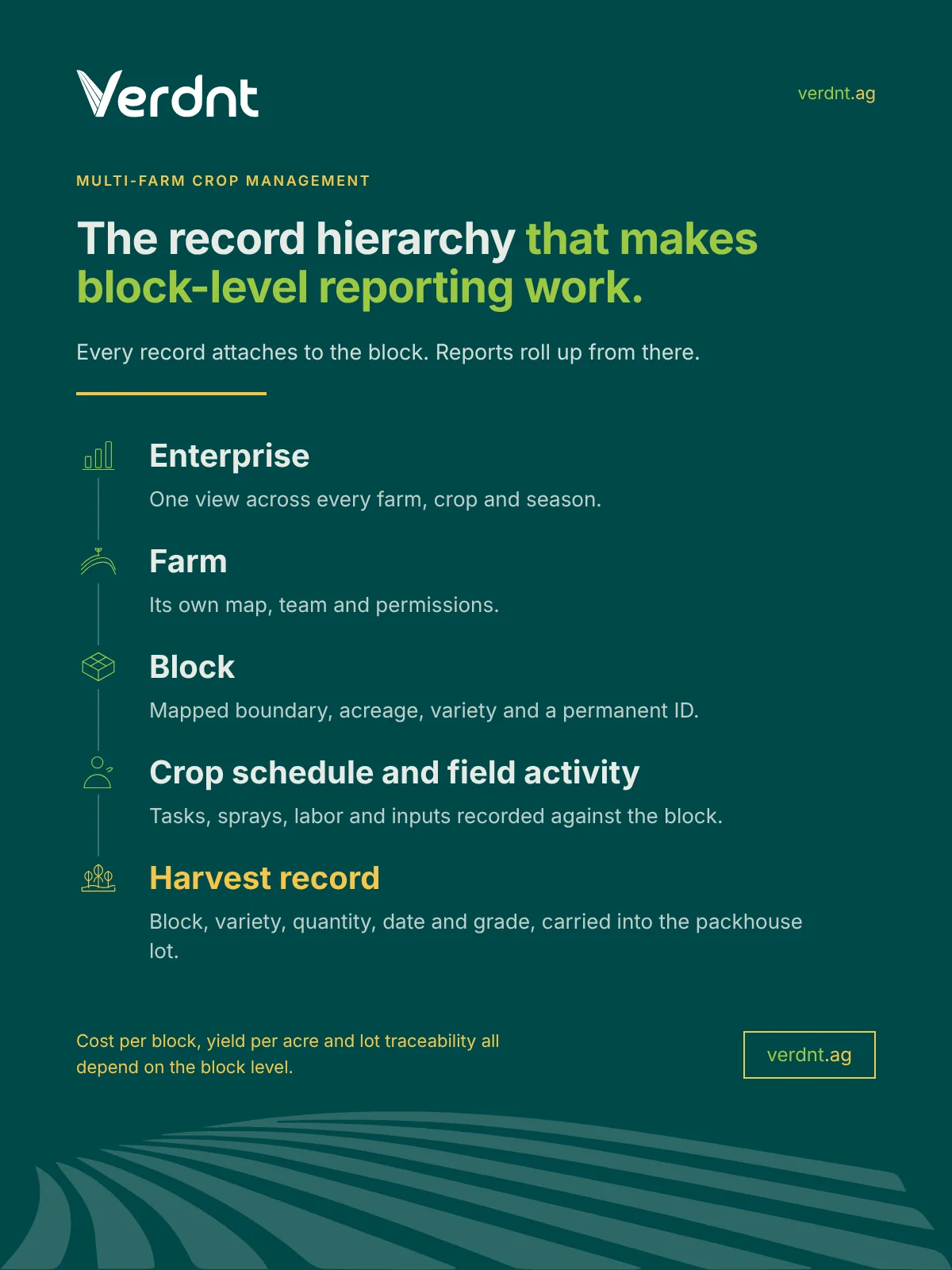
Crop management software for multiple farms and blocks should give every farm and block its own identifier and map, assign crop schedules per block, let field supervisors record activity on mobile against that block, and roll yields and costs up by farm, crop and season. The block, not the farm, has to be the unit every record attaches to.
That matters more as operations grow. Farms above 5,000 acres now control 42 percent of land in US farms (2022 Census of Agriculture), and the businesses running them manage dozens of blocks with different varieties, planting dates and spray programs. A farm-level average hides the block that is losing money, carrying a residue risk, or feeding a buyer's traceability request.
What multi-farm crop software is
Multi-farm crop management software is a system that manages crop planning, field activity, inputs, labor and harvest across several farms, with each farm broken into mapped blocks and every record tied to a specific block. It gives farm managers their own site and gives head office a combined view.
The term covers a wide range. Some tools are farm diaries with a multi-farm switch. Others are enterprise platforms that link block records to procurement, inventory and traceability. The features below separate the two.
Why the block is the unit
Orchards, vineyards, produce ranches and plantations all manage at block level, because varieties, rootstocks, planting years and spray programs change block by block. Costs, yields and quality do too.
A record kept at farm level cannot answer the questions that drive decisions. Which block of a variety returned the most per acre? Which blocks were sprayed within the pre-harvest interval before picking? Which blocks fed the lot a retailer is asking about? Each answer needs records attached to the block.
Block-level records also matter downstream. Under FSMA 204, growers of foods on the Food Traceability List must keep a farm map naming each field or growing area with geographic coordinates, and harvest records naming the field (21 CFR Part 1, Subpart S).
A worked example across three farms
Take an apple grower-packer with three farms and 40 blocks. Gala sits on 11 of those blocks, planted across four different years on two rootstocks. Head office wants to know which Gala blocks earned the most per acre last season, and the packhouse has a buyer asking which blocks supplied one shipped lot.
With farm-level records, the answer to both is a week of spreadsheet work and a best guess. Labor was logged by crew and day, sprays by farm, and harvest by bin count at the packhouse door.
With block-level records, each Gala block has its own identifier, acreage from the map, and a crop program assigned to it. Supervisors recorded thinning hours, sprays and harvest bins against the block on their phones. The profitability question becomes a filtered report: yield, labor and input cost per acre for 11 blocks, side by side. The buyer question becomes a lookup, from the packed lot back to the harvest records and the blocks they name.
The software did not create new data. It attached the same field work to the right unit at the moment it was recorded.
Connecting crop records to the business
Crop management records become more valuable when they leave the farm without re-keying. Three connections matter most for multi-farm operations.
Harvest records should flow into packhouse intake and inventory, so a lot carries its block history. Labor and input records should flow into finance, so cost per block and profitability by crop and season come from actual work. Certificates and spray records should be tagged to blocks and lots, so audit requests can be answered from the system.
Ask vendors whether the crop module shares one data model with traceability and ERP functions, or exports to them. Shared records mean one identifier from block to invoice. Exports mean mapping fields between systems every season.
Eight features to look for
A farm and block hierarchy
The software should model your structure as it is: an enterprise, its farms, the blocks within each farm, and the crops and varieties on each block. Each level needs a permanent identifier, so records stay attached when a manager changes or a block is replanted.
Block maps with editable boundaries
Every block should be mapped with its boundary, area and location, and the boundary should be editable as blocks are split, merged or leased. Acreage drives cost per acre and yield per acre, so it needs to come from the map.
Crop schedules assigned per block
Crop programs, from planting through harvest, should be built once and assigned to each block, with growth stages and planned tasks. A manager then sees what is due on which block this week, across every farm.
Mobile capture for field supervisors
Field supervisors should record scouting, spraying, fertilizing and irrigation on a phone, in the block, against the block's identifier. Look for observation forms that change with the crop stage, plus GPS, timestamp and photo on each record. Records created this way are the ones auditors and buyers accept. See our guide to farm record keeping software vs spreadsheets for why capture method matters.
Labor and inputs costed by block
Labor hours and input applications should be recorded against the block and the task, so cost per block comes from records instead of allocations. Seasonal crews, piece rates and wage calculations by task or harvest need to be supported.
Remote sensing across every farm
Satellite crop health indices such as NDVI show stress across many blocks without a site visit. The software should hold historical imagery per block and raise alerts a supervisor can act on. Our explainer on NDVI, NDMI and NDRE covers what each index shows.
Roll-up dashboards by farm, crop and season
Head office needs to compare the same crop across farms, and the same block across seasons, on yield, acreage, input use and cost. Reports should export to Excel or PDF for finance and certification teams.
Harvest records that carry the block
The harvest record should name the block, variety, quantity, date and quality grade, and it should travel with the produce into the packhouse lot. This is where crop management meets traceability. Our guide to what a traceability system should do at the farm level covers the handoff in detail.
Manage Better. Track Everything.
Verdnt brings farm management and traceability together in one platform, giving your team the visibility and data needed to manage operations with confidence.
Questions to ask before you buy
Run every vendor through the same questions, using one of your own farms.
| Question | Why it matters |
|---|---|
| Can you model our farms, blocks and varieties as they are today? | Forced structures break reporting |
| Is every field record tied to a block identifier? | Farm-level records cannot answer block questions |
| Does each record carry GPS, timestamp and photo? | Evidence for audits and buyers |
| Can one crop program be assigned to many blocks? | Planning effort across farms |
| How is labor costed by block and task? | Cost per block accuracy |
| Can we compare one crop across farms in one report? | The core multi-site view |
| How does a harvest record link to the packhouse lot? | Traceability beyond the farm gate |
| How do we onboard supervisors on each farm? | Adoption decides data quality |
For a ranked view of named platforms, see our comparison of the best farm management software for multi-site operations.
When spreadsheets are still enough
Spreadsheets can work for one farm with a handful of blocks, one crop and an owner who records everything personally. Once several supervisors record data across farms, the spreadsheet becomes a collection of versions, and nobody can say which spray record is final.
Three signs say it is time to move: head office cannot compare farms without a week of consolidation, an auditor or buyer asks for block-level records you have to rebuild, or cost per block is an estimate.
Mistakes that stall a rollout
The first mistake is mapping farms but not blocks. Everything recorded afterward inherits that coarse structure, and fixing it later means re-entering history.
The second is designing forms at head office without the supervisors who use them. Long forms with free-text fields get skipped in the field. Short, stage-specific forms with dropdowns get used.
The third is rolling out to every farm at once. Start with one farm and one crop, run a full season, and check that the roll-up reports answer the questions you bought the system for. Our guide to managing multiple farms from one system covers the consolidation steps.
Where to start
Multi-farm crop management software works when the block is the unit every record attaches to, from crop schedule to harvest. Before you talk to vendors, list your farms, blocks and varieties, and write down the three reports head office cannot produce today. Use them as your demo script.
Verdnt runs farm and crop management for multi-site operations, with each farm and plot given an identifier, crop schedules assigned against each Land ID, supervisor field records captured on mobile with timestamp and image validation, and harvest records that carry into lot traceability. See Verdnt farm management, or book a demo and we will model one of your farms block by block.
Discover a smarter way to manage farms, data, and traceability.
See how Verdnt can help you gain better visibility across your farm operations and make more informed decisions.
Frequently asked questions
What crop management software supports multiple farms and blocks?
Look for software that models an enterprise, its farms and the blocks within each farm, assigns crop schedules per block, captures field work on mobile against the block, and rolls up yield and cost by farm, crop and season. Verdnt supports this with farm and land identifiers that carry into harvest and lot traceability.
What farm mapping software supports block-level record keeping?
Choose software that maps each block with an editable boundary, area and coordinates, and ties every spray, labor and harvest record to that block's identifier. Block maps should drive acreage for cost per acre and supply the field coordinates FSMA 204 requires for foods on the Food Traceability List.
What farm record keeping software will field supervisors actually use?
Supervisors use software that works on a phone in the block, shows only the observations relevant to the current crop stage, and uses dropdowns instead of free text. GPS, timestamp and photo should be captured automatically. Short forms designed with supervisors get filled in, while long office-designed forms get skipped.
When is a spreadsheet enough for crop records?
A spreadsheet can work for one farm with a few blocks, one crop and one person recording everything. Move to software when several supervisors record across farms, when head office cannot compare farms without manual consolidation, or when auditors and buyers ask for block-level records you have to rebuild.
How do you track costs by block across multiple farms?
Record labor hours and input applications against the block and task at the time the work is done, and take acreage from the block map. Cost per block then comes from actual records. Allocating farm-level costs to blocks afterward hides which blocks lose money.
Written by
Founder and CEO - Verdnt
Vinay Nair is the Founder and CEO of Verdnt, an enterprise agri-tech SaaS platform that helps agricultural businesses integrate data from tractors, sensors, satellites, weather stations, and mobile applications. His experience building and scaling technology for the agriculture sector gives him first-hand expertise in agri-tech, farm data management, digital transformation, sustainability, and enterprise software. Vinay regularly shares insights on how data and AI can help agricultural businesses improve productivity, strengthen supply chain traceability, and make better operational decisions.
RELATED READS
Best Farm Management Software for Multi-Site Operations (2026): 8 Platforms Compared
Vinay NairNov 24, 2026
What Should a Traceability System Do at the Farm Level? 9 Must-Have Capabilities
Vinay NairNov 22, 2026
Which Agricultural Traceability Vendors Have Documented Customer Results?
 Dr. Richa NairNov 18, 2026